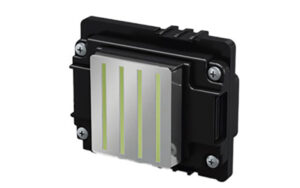
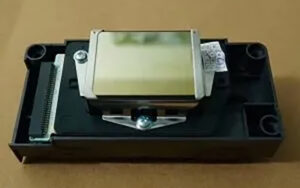
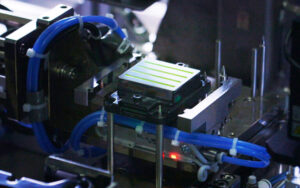
The Epson I3200 printhead lifespan depends on operating conditions, ink compatibility, maintenance practices, and production demands. Rather than replacing a printhead after a fixed period, printer operators should monitor print quality and performance to determine when replacement is necessary.
For businesses using industrial inkjet printers, making this decision at the right time can help control maintenance costs and avoid unnecessary production interruptions.
1. What Affects Epson I3200 Printhead Lifespan?
Several factors can influence how long an Epson I3200 printhead remains suitable for production.
● Ink compatibility: Use an ink type appropriate for the exact printhead variant and printer system.
● Ink quality: Contamination or unsuitable ink can contribute to nozzle problems and unstable printing.
● Maintenance practices: Appropriate cleaning and regular inspection of the ink delivery system help maintain stable operation.
● Operating conditions: Temperature, humidity, and periods of inactivity can affect ink behavior and maintenance requirements.
● Production workload: Frequent operation and demanding production schedules can increase maintenance requirements over time.
There is no single lifespan that applies to every installation. Actual performance should be evaluated in the context of the printer and its working environment.
2. Signs That Your Printhead May Need Replacement
A printhead does not necessarily need replacing whenever a print defect appears. However, persistent problems may indicate that its performance has deteriorated.
Watch for these warning signs:
● Nozzle loss that persists after appropriate maintenance
● Print banding that remains after checking alignment and calibration
● Uneven ink density or inconsistent output
● Increasing cleaning frequency with limited improvement
● Repeated print defects that affect finished products
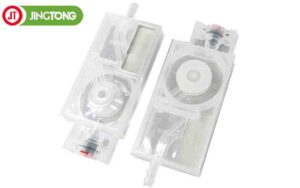
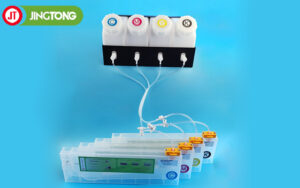
Before concluding that the printhead has failed, inspect other possible causes, including ink supply, dampers, filters, cables, and printer settings.
3. Should You Repair or Replace the Printhead?
The right decision depends on the cause and severity of the problem.
Continue troubleshooting when:
● Missing nozzles may be caused by an ink supply issue.
● Print quality improves after appropriate maintenance.
● The defect may result from calibration or printer settings.
● The printer has not yet been checked for related component problems.
Consider replacement when:
● Persistent defects remain after appropriate troubleshooting.
● Print quality no longer meets production requirements.
● Repeated maintenance does not restore acceptable performance.
● A qualified diagnosis indicates that the printhead is damaged or degraded.
Avoid repeated cleaning cycles beyond the manufacturer’s recommended procedure. Excessive or incorrect cleaning may waste ink and create additional risks.
4. Calculate the Real Cost of Replacement
The purchase price is only one part of the cost of a printhead replacement. Industrial printing businesses should also consider:
● Printhead purchase and shipping costs
● Technician labor and installation
● Ink used during testing and setup
● Production downtime during troubleshooting or replacement
● Rejected prints and rework caused by unstable output
If defects are affecting customer orders, delaying replacement may cost more than the component itself. Conversely, replacing a head before confirming the cause can result in unnecessary spending.
A practical decision should compare the expected cost of continued operation with the total cost and benefits of replacement.
5. How to Help Extend Printhead Service Life
Although printhead replacement is eventually part of equipment maintenance, good operating practices can help reduce avoidable problems.
● Use the ink type specified for the installed printhead variant.
● Follow the printer manufacturer’s maintenance schedule.
● Keep the ink supply clean and inspect filters and dampers regularly.
● Use the recommended shutdown and storage procedures during periods of inactivity.
● Avoid unapproved cleaning fluids and excessive cleaning cycles.
● Monitor nozzle-check results and print quality so changes are identified early.
Maintenance can help reduce preventable failures, but it cannot guarantee a particular service life.
6. Confirm the Correct I3200 Variant Before Ordering
The Epson I3200 family includes different variants intended for different ink-system applications. For example, I3200-A1 is associated with aqueous ink systems, I3200-E1 with eco-solvent systems, and I3200-U1 with UV-curable ink systems.
These variants should not be treated as interchangeable. Confirm the full model number and compatibility with your printer before purchasing a replacement.
Conclusion
The best way to manage Epson I3200 printhead lifespan is to monitor performance rather than rely on a fixed replacement interval. Investigate persistent nozzle loss, banding, unstable output, and increasing maintenance needs before deciding whether to continue troubleshooting or replace the head.
A careful diagnosis helps reduce unnecessary parts costs, protect production quality, and plan maintenance more effectively.