Industrial printhead maintenance is essential for maintaining print quality, reducing unexpected downtime, and controlling operating costs. Whether a printer uses Epson, Ricoh, Konica Minolta, Kyocera, or another piezoelectric printhead, a consistent maintenance routine helps identify problems before they affect production.
The correct procedure depends on the printhead model, ink type, and printer design. This guide covers practical inspection routines and troubleshooting principles for industrial inkjet systems.
1. Check Print Quality Before Cleaning
A nozzle check is a useful first step when prints show missing lines, uneven color, or inconsistent density. Record the results so changes can be compared over time.
● Inspect nozzle-check patterns for missing or irregular lines.
● Compare current results with previous checks.
● Check whether defects affect one color channel or several.
● Confirm whether the issue appears consistently across different print jobs.
Avoid running repeated cleaning cycles without checking the results. Cleaning consumes ink, and excessive or inappropriate intervention may increase operating costs without solving the underlying problem.
2. Inspect the Ink Supply System
Print quality depends on more than the printhead itself. Ink delivery problems can cause symptoms that resemble clogged or damaged nozzles.
Inspect the following components:
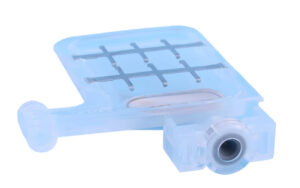
● Ink dampers: Check for leakage, air accumulation, deformation, or unstable ink delivery.
● Ink tubes: Look for kinks, loose connections, cracks, and visible air bubbles.
● Ink filters: Check whether contamination or restricted flow may be affecting ink supply.
● Ink pumps: Confirm that the pump operates as required by the printer’s maintenance system.
● Sub tanks and connectors: Inspect for leaks, contamination, and loose fittings.
Use the printer manufacturer’s diagnostic procedure to distinguish ink supply problems from printhead faults before replacing expensive components.
3. Maintain the Capping Station and Wiper
The capping station helps protect the nozzle area during idle periods and supports the printer’s cleaning system. The wiper removes ink residue from designated surfaces during maintenance.
Dried ink, contamination, or a poor cap seal can reduce cleaning effectiveness. Inspect these parts according to the printer’s maintenance schedule, using approved tools and cleaning materials.
Do not use a universal cleaning liquid or apply solvents to every component. Some seals, plastics, coatings, and printhead surfaces may be incompatible with certain chemicals.
4. Troubleshoot Common Printhead Problems
| Symptom | Possible causes | Recommended checks |
|---|---|---|
| Missing nozzles | Clogging, air in the ink path, or firing problems | Run a nozzle check and inspect ink delivery |
| Horizontal banding | Nozzle defects, alignment errors, or inconsistent ink flow | Check the nozzle pattern, alignment, and supply system |
| Uneven color density | Ink supply variation, incorrect settings, or nozzle loss | Compare color channels and inspect dampers |
| Repeated cleaning failure | Poor cap sealing, persistent blockage, or hardware damage | Inspect the maintenance station and seek technical diagnosis |
| Printhead not recognized | Cable, connector, board, or head-related electrical fault | Power down as specified and check connections professionally |
These symptoms can have multiple causes. A printhead should not be declared defective based on print appearance alone.
5. Follow a Preventive Maintenance Schedule
Daily or before production: Check print quality, inspect for ink leaks, and confirm that the printer is ready for operation.
Weekly or at the specified interval: Review nozzle-check records and inspect accessible ink-path and maintenance components.
During scheduled servicing: Check wear on the capping station, wiper, pump, filters, and other service parts. Replace components when inspection or the manufacturer’s schedule indicates that they are due.
For printers that remain idle for extended periods, follow the model-specific shutdown and storage procedure. Do not assume that every printhead can be stored using the same method.
6. When Should You Replace a Printhead?
Consider replacement only after checking the nozzle condition, ink supply, maintenance station, electrical connections, and relevant printer settings.
Before ordering a replacement, confirm:
● The complete printhead model and part number.
● The required ink type and printhead variant.
● Printer compatibility and installation requirements.
● The drive board, cable, and waveform requirements where applicable.
● Whether the existing fault can be resolved by replacing a maintenance component instead.
A compatible damper, pump, cable, or capping component may be the appropriate repair when the printhead itself remains functional.
Conclusion
Effective industrial printhead maintenance combines regular inspection, controlled cleaning, ink system checks, and accurate fault diagnosis. A documented maintenance routine