A DX5 big damper with nut is an ink system component used in selected inkjet printer configurations. It connects to the ink supply system and helps maintain a more consistent ink supply to the printhead. Choosing the correct damper requires attention to connector design, tube size, and printer compatibility.
1. What Does an Ink Damper Do?
An ink damper serves as an intermediate component between the ink supply line and the printhead. Depending on its design, it can help regulate ink delivery and reduce the impact of fluctuations in the supply system.
A worn, damaged, or incompatible damper may contribute to unstable ink flow or printing defects. However, similar symptoms can also result from clogged nozzles, air entering the ink lines, or other ink system problems. Inspect the entire ink path before replacing parts.
2. Key Features of the DX5 Big Damper with Nut
When selecting a replacement, consider these practical details:
● Nut-style connector: Check the connection structure against the original component.
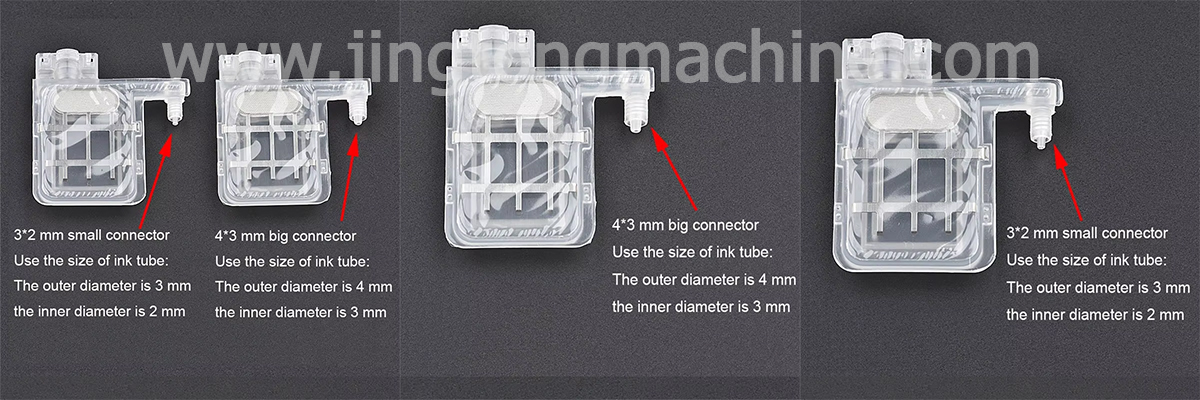
● 4 mm ink tube connection: Confirm that the tube diameter and fitting design match your printer’s ink system.
● Multiple connector options: Similar dampers may have different connector sizes or configurations.
● Replacement availability: Confirm the product condition, packaging, and warranty with the supplier before ordering.
These details are important because dampers that look similar may not fit the same printer assembly.
3. Printhead Compatibility
This type of damper is listed for selected configurations using Epson DX5, XP600, and Mimaki JV5-related printhead systems. Compatibility should not be assumed across every printer using these printheads.
Before purchasing, compare the original damper’s connector, tube fitting, dimensions, and installation position. If possible, provide the supplier with clear photos of the original part and the printer model.
4. When Should You Replace an Ink Damper?
Consider inspecting the damper when you experience recurring ink supply problems, visible leakage, damaged fittings, or air entering the ink line. Check the ink tubes, seals, and other related components at the same time.
After replacement, follow the printer manufacturer’s maintenance procedure and check for leaks or air in the ink path before resuming production. Avoid forcing a connector into place, as an incorrect fit can damage the ink system.
5. How to Choose the Right Replacement
The most reliable approach is to match the original part rather than selecting by product name alone. Confirm the printhead and printer model, tube size, connector type, and physical dimensions. For printers with modified or aftermarket ink systems, verify the actual installed configuration.
Conclusion
A suitable DX5 big damper with nut can help keep a compatible ink delivery system working reliably. Checking the connection details and confirming compatibility before ordering can reduce installation issues and unnecessary downtime.