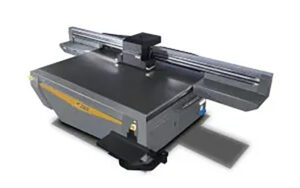
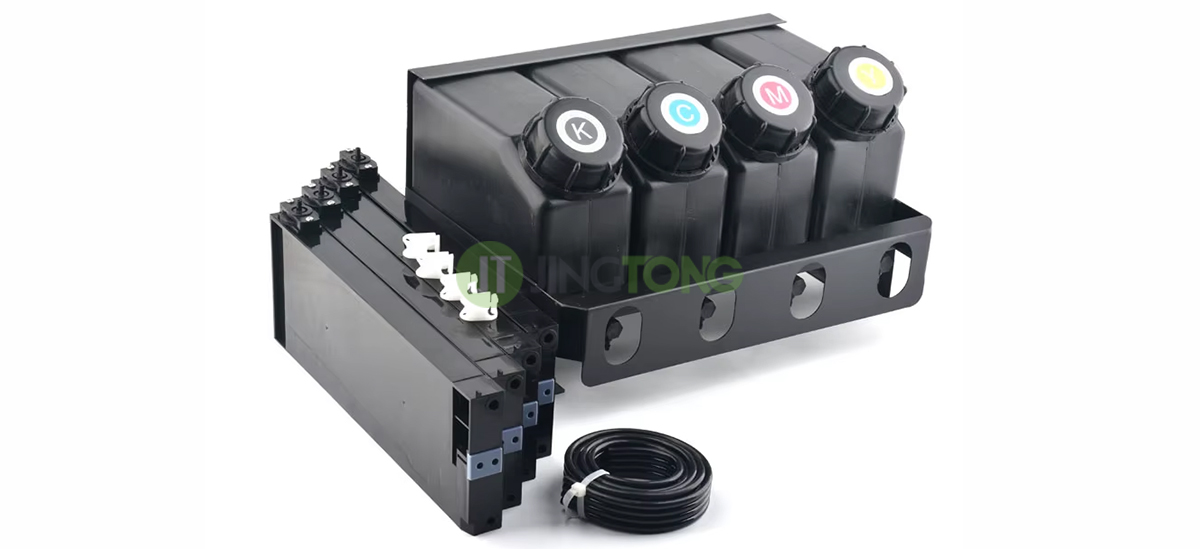
A UV printer ink cartridge is part of the machine’s ink supply system. Depending on the printer design, the term may refer to a main ink reservoir, a smaller carriage-mounted reservoir, or a replaceable cartridge. These components help store ink and deliver it to the printhead under suitable operating conditions.
A stable ink supply is essential for consistent printing. If ink flow is restricted, air enters the lines, or the pressure balance becomes unstable, the printer may show missing nozzles, color inconsistency, or printing interruptions. Understanding the role of each reservoir helps users identify potential problems and select compatible replacement parts.
Main Ink Tanks and Carriage Sub Tanks
Main Ink Tanks
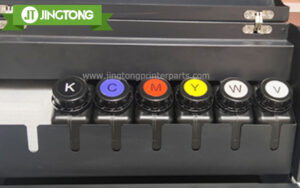
Main ink tanks store the ink used during production and allow operators to replenish the supply. In many UV flatbed printers, separate tanks are used for different ink channels, such as cyan, magenta, yellow, black, and white. Additional channels may be present depending on the printer configuration.
The main tank connects to the rest of the ink supply system through tubing and, on some machines, pumps or circulation components. Tank design and materials are important because UV ink must be stored in a way that is compatible with the ink chemistry and the printer’s operating environment.
Some UV printers use white-ink stirring or circulation mechanisms to help manage pigment settling. These features are model-dependent, so users should follow the manufacturer’s instructions rather than assume every printer has the same arrangement.
Carriage Sub Tanks
A carriage-mounted sub tank is positioned closer to the printhead. It acts as an intermediate ink reservoir and helps provide a more stable supply to the printhead as the carriage moves during printing.
Depending on the system, a sub tank may include a filter, a heater, a temperature sensor, or other supporting components. These features are not universal. Their presence and function should be confirmed from the machine’s technical documentation.
Because the sub tank is close to the printhead, a problem with its filter, seals, or connections may affect ink delivery directly. Incorrect installation or unsuitable replacement parts can also introduce air or cause leaks.
How Ink Moves Through the System
In a typical UV flatbed printer, ink moves from the main tank through the ink supply path toward the carriage sub tank and printhead. Pumps, tubing, filters, and pressure-control components may be used along the way, depending on the design.
Each component has a different role:
● Ink tank: Stores ink and supports replenishment.
● Ink pump: Moves ink where the system requires active pumping.
● Ink tube and fittings: Connect the reservoirs and other components.
● Ink filter: Captures particles that could interfere with ink flow or damage sensitive components.
● Sub tank: Provides an intermediate reservoir near the printhead.
● Seals and connectors: Help prevent leaks and unwanted air entry.
These parts work as a system. Replacing one component without checking the surrounding connections may leave the original problem unresolved.
Common Ink Cartridge Problems
Restricted Ink Flow
Particles and accumulated contamination can obstruct a filter or narrow ink passage. The resulting flow restriction may cause intermittent ink delivery or missing nozzles. If the printer shows these symptoms, check the manufacturer’s diagnostic procedure and inspect the relevant ink supply components before assuming the printhead has failed.
Ink Leakage
Leaks may occur at tank outlets, tube fittings, sub-tank connections, or sealing rings. A seal that has become worn or damaged may no longer provide a reliable connection, particularly after repeated removal and installation.
Stop the machine according to its service procedure if a leak is found. Clean up spilled ink using the recommended materials, and identify the source before restarting the printer.
Air in the Ink Line
Air may enter through a loose fitting, a damaged tube, an empty reservoir, or an incorrect maintenance procedure. Air in the ink path can disrupt the supply to the printhead and affect printing stability. Follow the printer manufacturer’s priming or air-removal instructions; do not apply unapproved pressure or suction.
Selecting Replacement Ink Cartridges and Sub Tanks
Before ordering a replacement, identify the printer brand and model, the component’s position in the ink system, and the part number where available. Check the tank capacity, inlet and outlet arrangement, mounting dimensions, seal design, and any built-in electrical or temperature-control features.
Also confirm ink compatibility. A reservoir or seal that is unsuitable for the ink formulation may deteriorate or cause leakage. For carriage sub tanks, ensure that the component matches the printer’s required supply configuration and pressure conditions.
Photos of the original part and its connections can help a supplier verify the correct specification. Avoid choosing a replacement based only on appearance.
Maintenance for More Reliable Ink Delivery
Keep ink containers closed when not in use, use ink that meets the printer’s specifications, and prevent dust or foreign material from entering the system during refilling. Inspect visible tubing and fittings for leaks, cracks, discoloration, or looseness.
Do not continue refilling or reusing a reservoir indefinitely without inspecting its condition. Filters, sponges, seals, and other internal elements can deteriorate or accumulate contamination over time. Replacement timing should follow the printer manufacturer’s guidance and the actual condition of the component.
Conclusion
UV printer ink cartridges, main tanks, and sub tanks each play a role in maintaining a consistent ink supply. Their performance depends on compatible materials, clean ink paths, sound seals, and correct system pressure.
When diagnosing ink delivery problems or sourcing replacement parts, check the complete ink path rather than focusing on the reservoir alone. Correct part identification and routine inspection can help reduce avoidable interruptions and protect the printhead.